
Price touches VWAP. It bounces. Someone circles the touch and posts the chart.
“VWAP held.”
That tells you where the bounce happened. Where did it tell you the bounce was coming? Where was the breakout target? What told you the next touch would hold instead of cutting straight through?
The average follows the prices and volume already counted. It doesn’t show the orders waiting ahead. And before you build a trade around the line, there’s another problem: which VWAP are you looking at?
A big fill can leave the average behind.
A large fill happens at the top. Price keeps selling off, with smaller and smaller fills on the way down. The latest price moves fast. The average barely moves.
100 points lower. VWAP barely follows.
| Fill | Price | Volume units | Running VWAP |
|---|---|---|---|
| 1 | 7,750 | 10,000 | 7,750.00 |
| 2 | 7,725 | 1,000 | 7,747.73 |
| 3 | 7,700 | 500 | 7,745.65 |
| 4 | 7,675 | 250 | 7,744.15 |
| 5 | 7,650 | 100 | 7,743.35 |
Illustrative prices and volume weights, not actual SPX executions. Each step is one hypothetical fill; spacing does not represent elapsed time.
The first fill carries more than 84% of the total volume. That keeps VWAP near the top even after price has dropped 100 points.
The calculation is doing exactly what it’s supposed to do. But it still doesn’t tell you where the selling stops. There’s no next buyer, downside target, or reason price has to return built into that average.
The settings are only part of it.
Two people can open the same ticker and end up with different VWAPs. Change the session, reset time, anchor, price source, chart interval, or data feed and you can change the result.
What prices are being counted?
TradingView’s built-in VWAP defaults to the average of each bar’s high, low, and close, weighted by volume. That isn’t the same as counting every execution at its actual price. The source and calculation timeframe can be changed too.
Sierra Chart can use chart-bar inputs or underlying trade data. NinjaTrader offers Standard and Tick modes. Session and trading-hours settings decide which part of the day gets included.
And what does “volume” mean?
TradingView gets volume from its data providers. Depending on the symbol and feed, that can be traded volume, tick volume counting price updates, or no usable volume at all. A count of price updates isn’t a count of contracts or shares traded.
You don’t need a new formula to get a different line. Change what gets counted, when the count starts, or how the prices are grouped, and the average can change.
Now watch the mechanics.
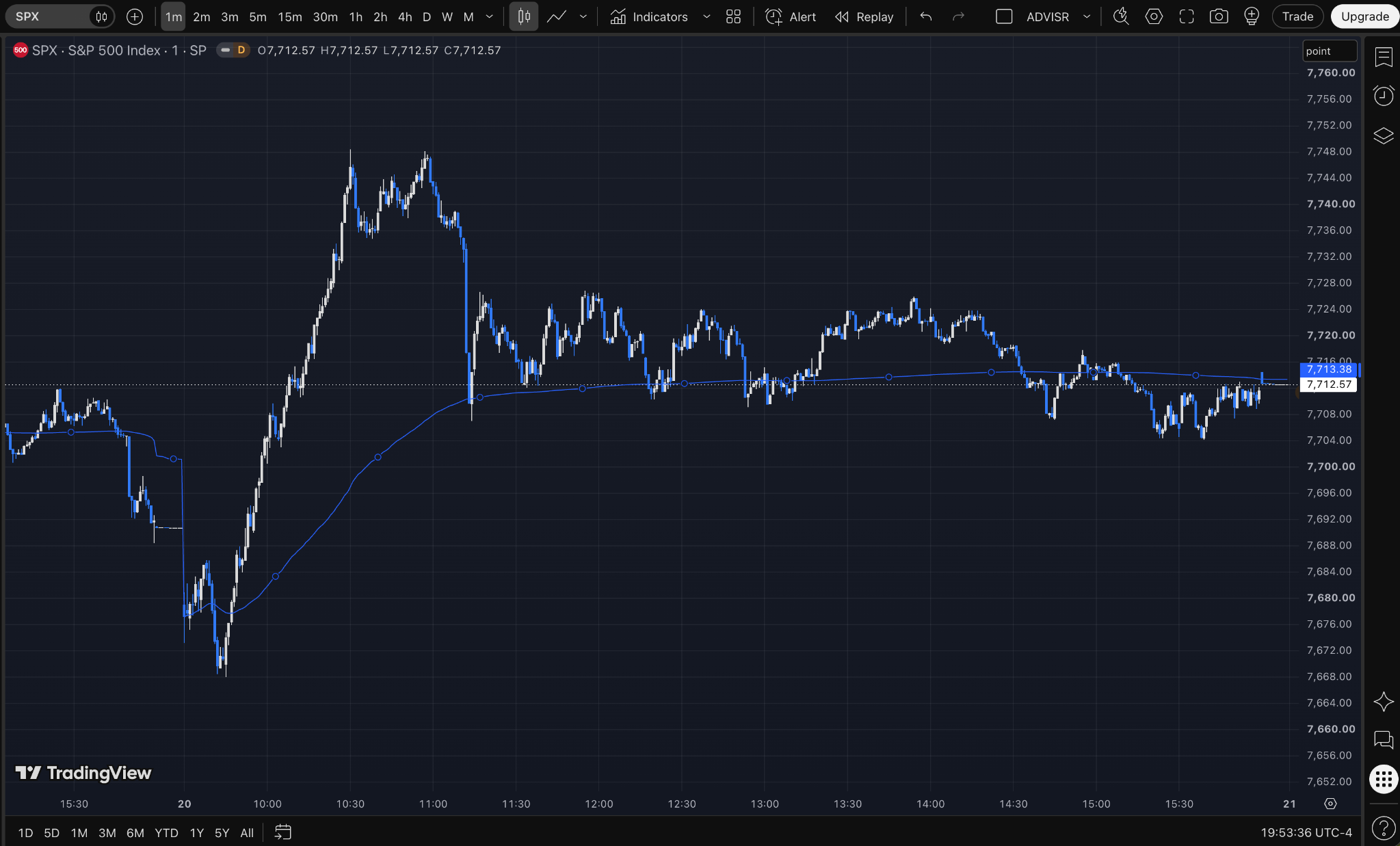
Start at the open, not with the finished chart. The early decline reaches roughly 7668–7670, then reverses into a strong morning rally. VWAP sits behind the move. It doesn’t give the upside destination.
ADVISR starts the session with a negative-gamma badge. For a dealer who is short gamma and rebalancing a delta hedge, rising price means buying more as the market rises. That can add to a rally rather than lean against it.
The badge still reads GEX−. Crossing that plotted level and the badge changing are separate observations here.
This is the first positive-gamma badge in the sequence. Long-gamma hedging works in the other direction: sell into rises and buy into declines.
Price passes +1 IV around 7733.16 and the 7735 exposure area. Positive gamma doesn’t turn the chart into a hard ceiling.
Price falls through +1 IV and +1 HV before rebounding. Watch the actual response instead of assuming the badge guarantees the next move.
Price keeps knocking around the intraday levels below and +1 HV above. Those levels frame the later range as price rotates through it. The HV band is a reference here, not a calculated mean or a promise that price has to return.
The badge switches several more times later in the day. The exposure map is changing with the session; it isn’t one fixed morning label carried to the close.
That’s the recap worth doing: where did price react as expected, and where did it keep going? The 10:30 extension and 11:15 reversal belong in the explanation just as much as the cleaner reactions.
The badge and exposure map are modeled measures, not a record of individual dealer trades. The sequence can test the expected mechanics; it can’t establish anyone’s actual inventory, hedge fills, or profit and loss.
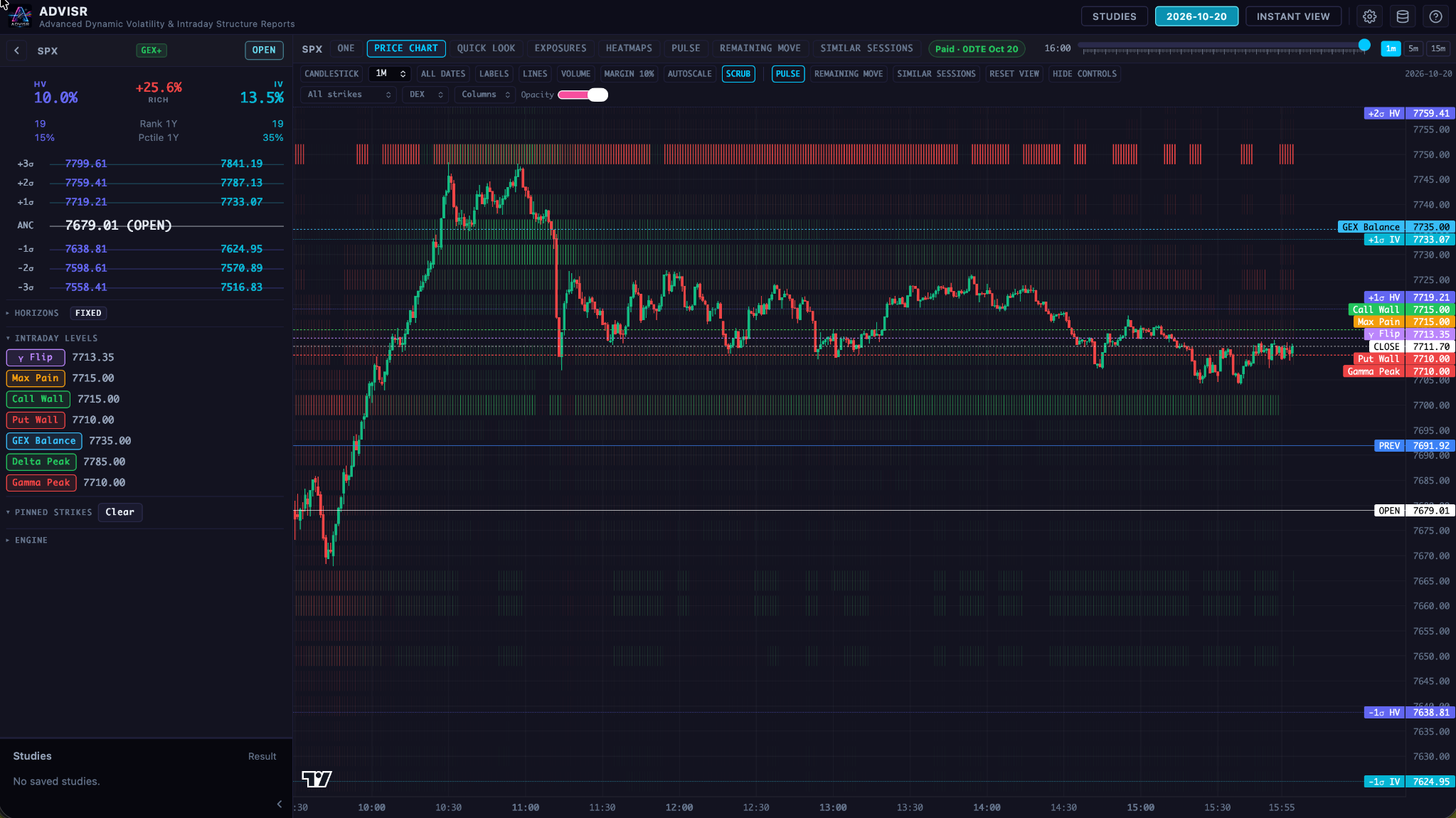
By the right edge of the TradingView chart, VWAP is 7713.38. That puts the average near the late-session range and the final 7710–7715 exposure labels, just below +1 HV.
Circling the VWAP touches leaves out almost all of that context. Exposure doesn’t calculate VWAP. Price and volume do. The question is what was happening around those prices while the day unfolded.
What about the day it never comes back?
October 14 gives you the counterexample. After the early break below VWAP, price stays below it for the rest of the displayed session.
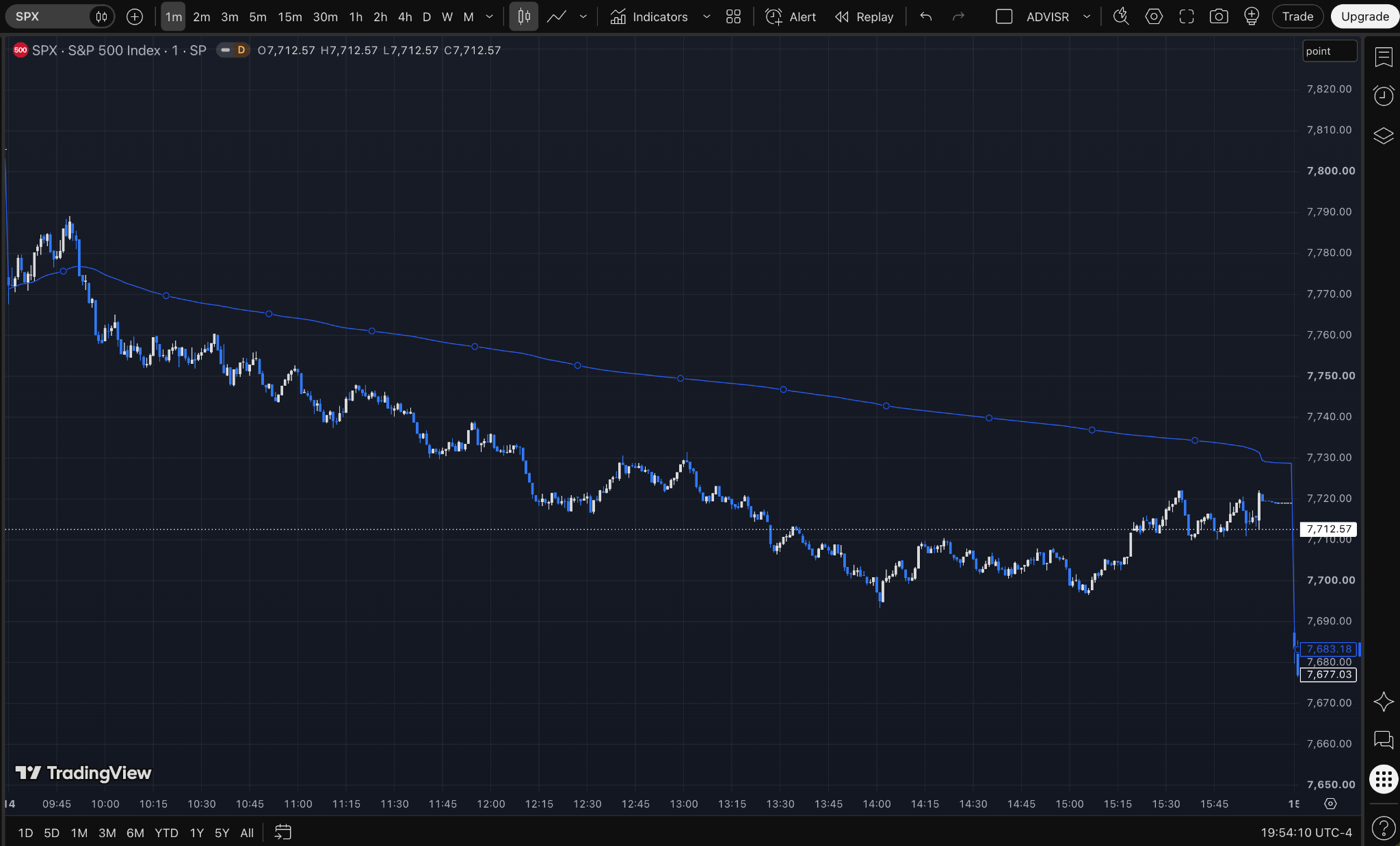
Price sells off, extends away from the average, and recovers some ground without returning to it. The line overhead doesn’t mark the low or tell you the downside destination.
Put the two days side by side. October 20 gives you plenty of later interactions to circle. October 14 spends most of the displayed session somewhere else.
A bounce needs an explanation.
What was visible before price got there? Where were the exposures and forecast levels? What changed during the move? Where did the expected response fail?
That’s what we need to explain. “VWAP held” isn’t enough.
Sources and calculation references
- TradingView: VWAP calculation, source, anchor and timeframe
- TradingView: traded volume, tick volume and missing volume
- Sierra Chart: chart-bar and underlying-data VWAP
- NinjaTrader: Standard and Tick VWAP
- Cboe: gamma hedging and market impact
- CME: gamma and changing delta
Charts supplied by Bryan; replay captured from ADVISR. TradingView screenshots show SPX, 1-minute, Session VWAP. The exact source selection and volume type in those screenshots are not established.